
Previously we looked at how the kernel manages virtual memory
for a user process, but files and I/O were left out. This post covers
the important and often misunderstood relationship between files and
memory and its consequences for performance.
Two serious problems must be solved by the OS when it comes to files. The first
one is the mind-blowing slowness of hard drives, and
disk seeks in particular,
relative to memory. The second is the need to load file contents in physical
memory once and share the contents among programs. If you use
Process Explorer to poke
at Windows processes, you’ll see there are ~15MB worth of common DLLs loaded in
every process. My Windows box right now is running 100 processes, so without
sharing I’d be using up to ~1.5 GB of physical RAM just for common DLLs. No
good. Likewise, nearly all Linux programs need ld.so and libc, plus other common
libraries.
Happily, both problems can be dealt with in one shot: the page
cache, where the kernel stores page-sized chunks of files. To
illustrate the page cache, I’ll conjure a Linux program named
render, which opens file scene.dat and reads it 512 bytes at a
time, storing the file contents into a heap-allocated block. The first
read goes like this:
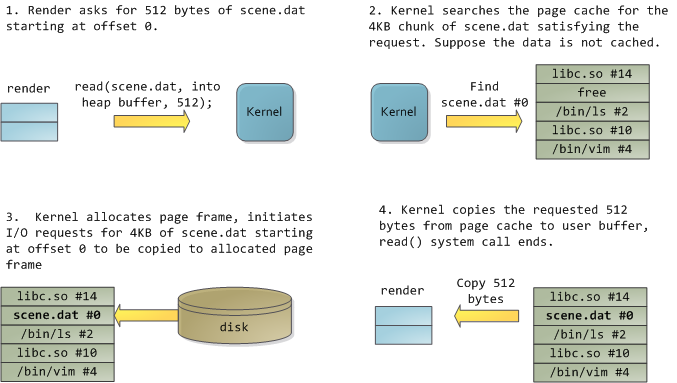
After 12KB have been read, render‘s heap and the relevant page frames
look thus:
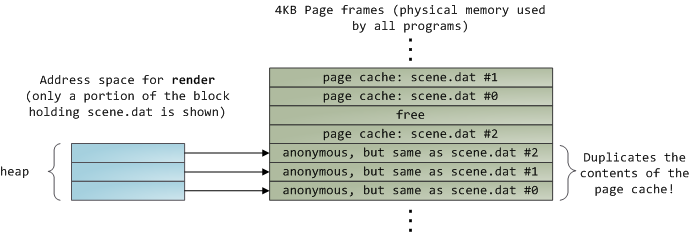
This looks innocent enough, but there’s a lot going on. First, even
though this program uses regular read calls, three 4KB page frames are
now in the page cache storing part of scene.dat. People are sometimes
surprised by this, but all regular file I/O happens through the page
cache. In x86 Linux, the kernel thinks of a file as a sequence of 4KB
chunks. If you read a single byte from a file, the whole 4KB chunk
containing the byte you asked for is read from disk and placed into the
page cache. This makes sense because sustained disk throughput is pretty
good and programs normally read more than just a few bytes from a file
region. The page cache knows the position of each 4KB chunk within the
file, depicted above as #0, #1, etc. Windows uses 256KB views
analogous to pages in the Linux page cache.
Sadly, in a regular file read the kernel must copy the contents of the
page cache into a user buffer, which not only takes cpu time and hurts
the cpu caches, but
also wastes physical memory with duplicate data. As per the diagram
above, the scene.dat contents are stored twice, and each instance of
the program would store the contents an additional time. We’ve mitigated
the disk latency problem but failed miserably at everything else.
Memory-mapped files are the way out of this madness:
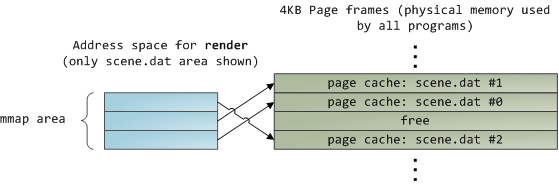
When you use file mapping, the kernel maps your program’s virtual pages
directly onto the page cache. This can deliver a significant performance
boost: Windows System Programming
reports run time improvements of 30% and up relative to regular file
reads, while similar figures are reported for Linux and Solaris in
Advanced Programming in the Unix Environment.
You might also save large amounts of physical memory, depending on the
nature of your application.
As always with performance, measurement is everything,
but memory mapping earns its keep in a programmer’s toolbox. The API is
pretty nice too, it allows you to access a file as bytes in memory and
does not require your soul and code readability in exchange for its
benefits. Mind your address space
and experiment with
mmap
in Unix-like systems,
CreateFileMapping
in Windows, or the many wrappers available in high level languages. When
you map a file its contents are not brought into memory all at once, but
rather on demand via page faults. The fault
handler maps your virtual pages onto the
page cache after
obtaining a page
frame with the needed file contents. This involves disk I/O if the
contents weren’t cached to begin with.
Now for a pop quiz. Imagine that the last instance of our render
program exits. Would the pages storing scene.dat in the page cache be
freed immediately? People often think so, but that would be a bad idea.
When you think about it, it is very common for us to create a file in
one program, exit, then use the file in a second program. The page cache
must handle that case. When you think more about it, why should the
kernel ever get rid of page cache contents? Remember that disk is 5
orders of magnitude slower than RAM, hence a page cache hit is a huge
win. So long as there’s enough free physical memory, the cache should be
kept full. It is therefore not dependent on a particular process, but
rather it’s a system-wide resource. If you run render a week from now
and scene.dat is still cached, bonus! This is why the kernel cache
size climbs steadily until it hits a ceiling. It’s not because the OS is
garbage and hogs your RAM, it’s actually good behavior because in a way
free physical memory is a waste. Better use as much of the stuff for
caching as possible.
Due to the page cache architecture, when a program calls
write()
bytes are simply copied to the page cache and the page is marked dirty.
Disk I/O normally does not happen immediately, thus your program
doesn’t block waiting for the disk. On the downside, if the computer
crashes your writes will never make it, hence critical files like
database transaction logs must be
fsync()ed
(though one must still worry about drive controller caches, oy!). Reads,
on the other hand, normally block your program until the data is
available. Kernels employ eager loading to mitigate this problem, an
example of which is read ahead where the kernel preloads a few pages
into the page cache in anticipation of your reads. You can help the
kernel tune its eager loading behavior by providing hints on whether you
plan to read a file sequentially or randomly (see
madvise(),
readahead(),
Windows cache hints
).
Linux does read-ahead for
memory-mapped files, but I’m not sure about Windows. Finally, it’s
possible to bypass the page cache using
O_DIRECT
in Linux or
NO_BUFFERING
in Windows, something database software often does.
A file mapping may be private or shared. This refers only to
updates made to the contents in memory: in a private mapping the
updates are not committed to disk or made visible to other processes,
whereas in a shared mapping they are. Kernels use the copy on write
mechanism, enabled by page table entries, to implement private mappings.
In the example below, both render and another program called
render3d (am I creative or what?) have mapped scene.dat privately.
Render then writes to its virtual memory area that maps the file:
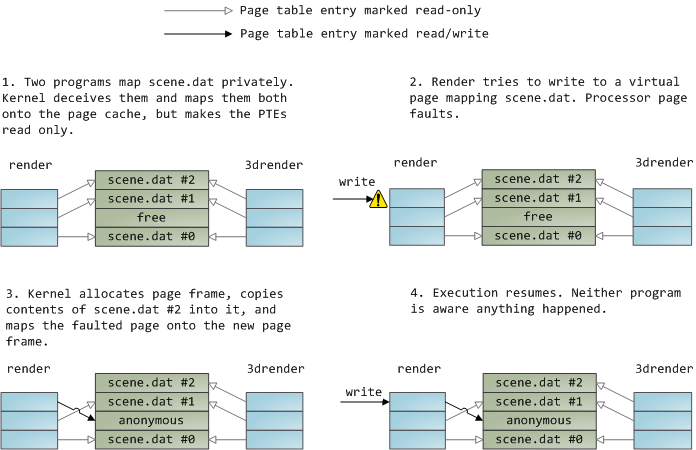
The read-only page table entries shown above do not mean the mapping
is read only, they’re merely a kernel trick to share physical memory
until the last possible moment. You can see how ‘private’ is a bit of a
misnomer until you remember it only applies to updates. A consequence of
this design is that a virtual page that maps a file privately sees
changes done to the file by other programs as long as the page has only
been read from. Once copy-on-write is done, changes by others are no
longer seen. This behavior is not guaranteed by the kernel, but it’s
what you get in x86 and makes sense from an API perspective. By
contrast, a shared mapping is simply mapped onto the page cache and
that’s it. Updates are visible to other processes and end up in the
disk. Finally, if the mapping above were read-only, page faults would
trigger a segmentation fault instead of copy on write.
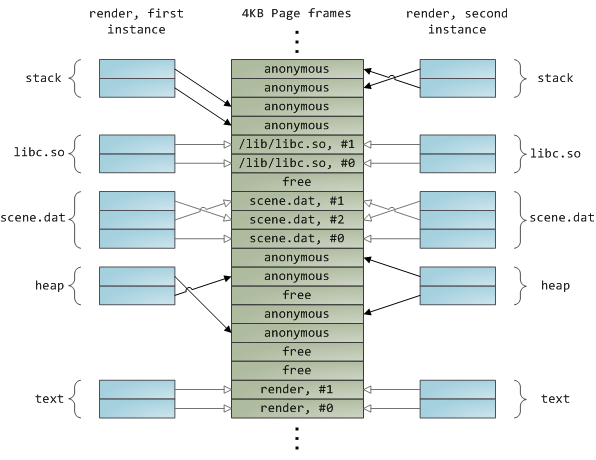
Dynamically loaded libraries are brought into your program’s address
space via file mapping. There’s nothing magical about it, it’s the same
private file mapping available to you via regular APIs. Below is an
example showing part of the address spaces from two running instances of
the file-mapping render program, along with physical memory, to tie
together many of the concepts we’ve seen.
This concludes our 3-part series on memory fundamentals. I hope the
series was useful and provided you with a good mental model of these OS
topics.
